monday.com alternative for PMOs
A monday.com alternative your PMO doesn't have to assemble
monday.com gives teams flexible building blocks. Celoxis gives your PMO planning, capacity, time, expenses, financials, workflows, and reporting that come built in and already work together.
- Core PMO controls built in
- 14-day free trial
- Human setup guidance
Beyond flexible boards
A complete PMO, ready to run
Planning, capacity, financial control, governance, and portfolio reporting work together from the start.
A good starting point
Flexible work boards
Boards help teams organize lightweight work and collaborate around it in a flexible way.
Celoxis
A connected PMO system
Plans, resources, actuals, budgets, risks, and portfolio decisions share one data model.
The hidden cost
The system behind the system
Licensing is only part of the cost. Core controls built from boards, formulas, automations, and add-ons still need someone to design and maintain them.
What comes built in
Everything a serious PMO expects to work out of the box
Configuration should model what makes your business different, not rebuild standard PMO controls.
- 01
Planning that recalculates
Task hierarchies, dependencies, critical paths, multiple calendars, baselines, and cross-project dependencies in a true scheduling engine.
- 02
Capacity across every project
Availability and demand across projects, calculated from work calendars, roles, leave, and live assignments.
- 03
Time and expenses
Timesheets, billable status, receipts, and approvals captured in the same system as the plan.
- 04
Project financials
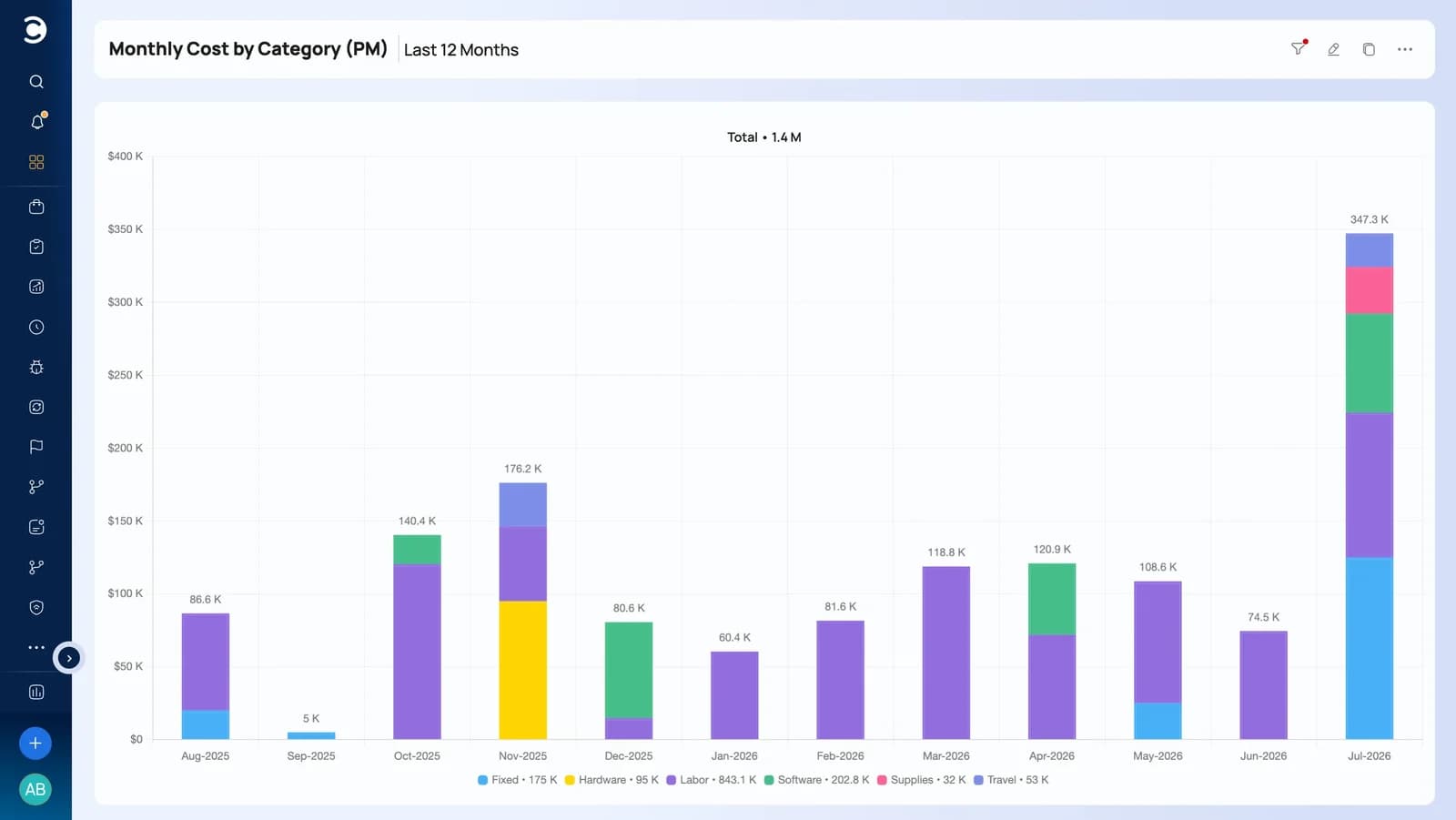
Budgets, hours, costs, revenue, billing, cash flow, profit, and margin on a native project financial model.
- 05
Governance workflows
Risks, issues, requests, change control, and defects run through configurable apps with forms, rules, and escalations.
- 06
Cross-project reporting
Dashboards, trend charts, drill-downs, and scheduled reports built on live data from every project.
Plans that respect reality
Know whether people and budget can support the plan
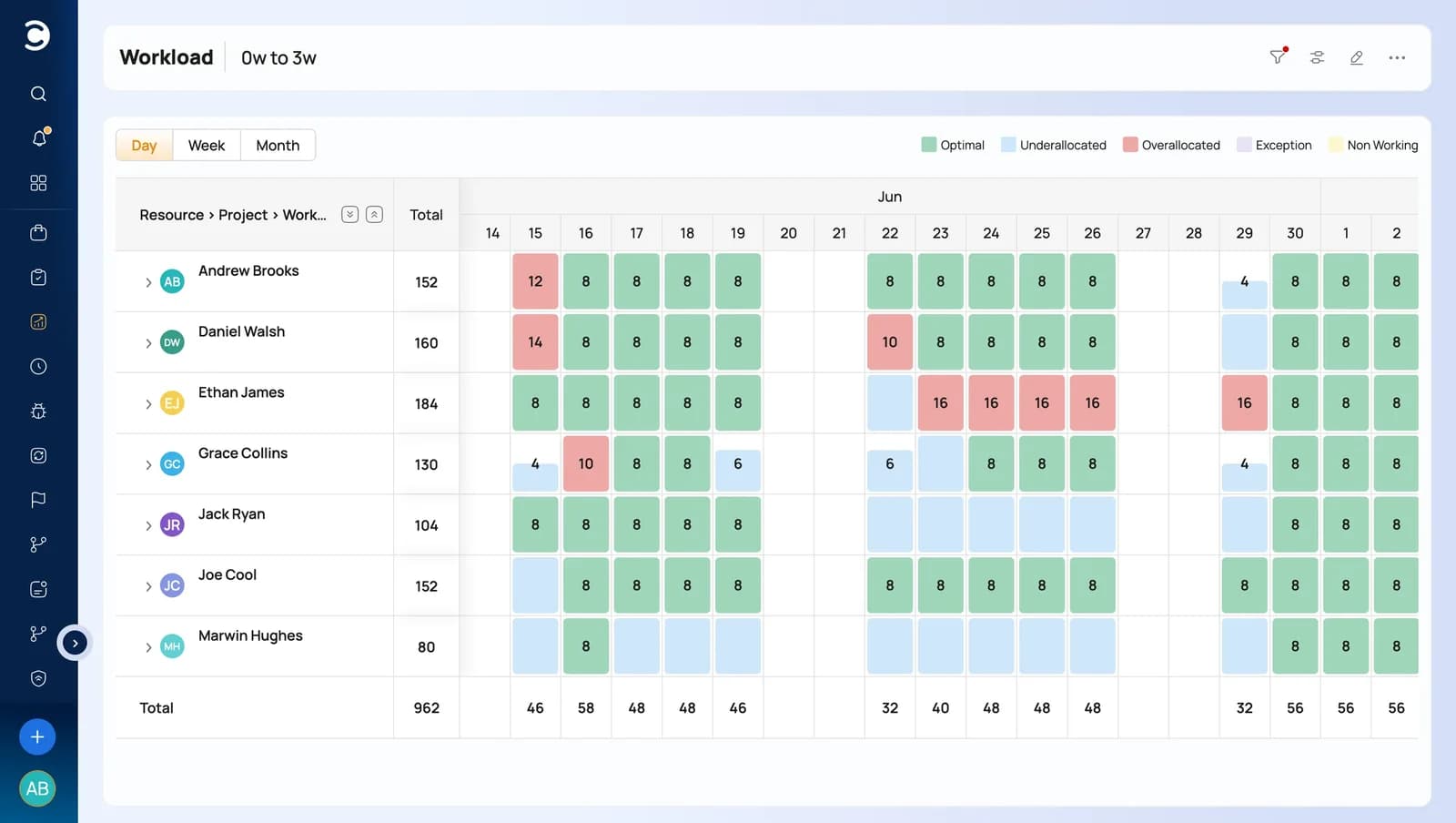
Workload is calculated from real assignments, calendars, availability, and commitments across every project, not from a status column someone remembers to update.
As time and expenses are logged, actuals update costs and forecasts, and those numbers flow into budget, utilization, profitability, and portfolio reports.
A better buying test
Don't compare feature lists. Test five live actions.
A strong PMO platform should connect these actions in one demo, using one set of current data.
Review-platform comparisons
Here's what actual buyers are saying
Aggregated from head-to-head comparisons on the platforms enterprise buyers check before shortlisting.
Celoxis has better project management capabilities than monday.com
monday.com does not have portfolio management capabilities
Celoxis has more comprehensive resource management capabilities than monday.com
Celoxis has better product capabilities than monday.com
Celoxis offers more granular enterprise-level security and user management capabilities than monday.com
Celoxis outperforms monday.com in terms of quality of support
Move without rebuilding
Bring your monday.com plans with you
Import your existing monday.com plans instead of rebuilding them. Tasks, hierarchy, dates, durations, dependencies, milestones and resource assignments come across intact, into a plan the whole organization can work in.
From there, progress is updated in one place, resource managers see capacity across every project, and leaders read live portfolio reporting without waiting for another spreadsheet or status deck.
Bring one representative plan to the demo and see how the move would work on your own schedule.
Where Celoxis fits
Enterprise control, without the enterprise implementation
Every category of tool trades something away. Task tools trade depth, desktop schedulers trade breadth, legacy PPM trades adoption. Celoxis is built for the quadrant where control and usability meet.
Fast, but shallow
- Great for team tasks, boards and collaboration
- Limited capacity, resource and financial visibility
- Struggle to scale across teams and portfolios
Work gets managed. The business does not.
The execution control zone

 Execution Control
- Scheduling
- Resources
- Financials
- Governance
- Portfolio
- Insights
Enterprise-grade control with team-friendly adoption.
Precise, but isolated
- Excellent single-project scheduling depth
- One plan at a time: no live portfolio or capacity view
- Financials, reporting and intake handled in other tools
Every plan is accurate. The portfolio is still assembled by hand.
Powerful, but painful
- Strong governance, portfolio and financial control
- Heavy administration and long deployment cycles
- Low team adoption slows execution
You pay for control in complexity and change effort.
Only one quadrant gives you enterprise control without slowing the people doing the work.
Celoxis connects portfolio control directly to how work gets done.
Execution OS
This is not generic productivity. This is execution control.
The delivery lifecycle
One system from the first request to the reported outcome
Scheduling is one stage of nine. Celoxis carries the same plan, the same numbers and the same people through all of them, so nothing is re-entered at a handover.
Stage 01 · Demand intake
Every request enters one funnel
Project, change and service requests arrive through dynamic forms with conditional logic, so intake is structured from the first field instead of scattered across email and spreadsheets.
- Dynamic request forms
- Conditional logic
- Automated routing
Go beyond boards
The capabilities that appear once you manage a portfolio
Pick a capability to see what it covers and the real Celoxis screen your teams will work in.
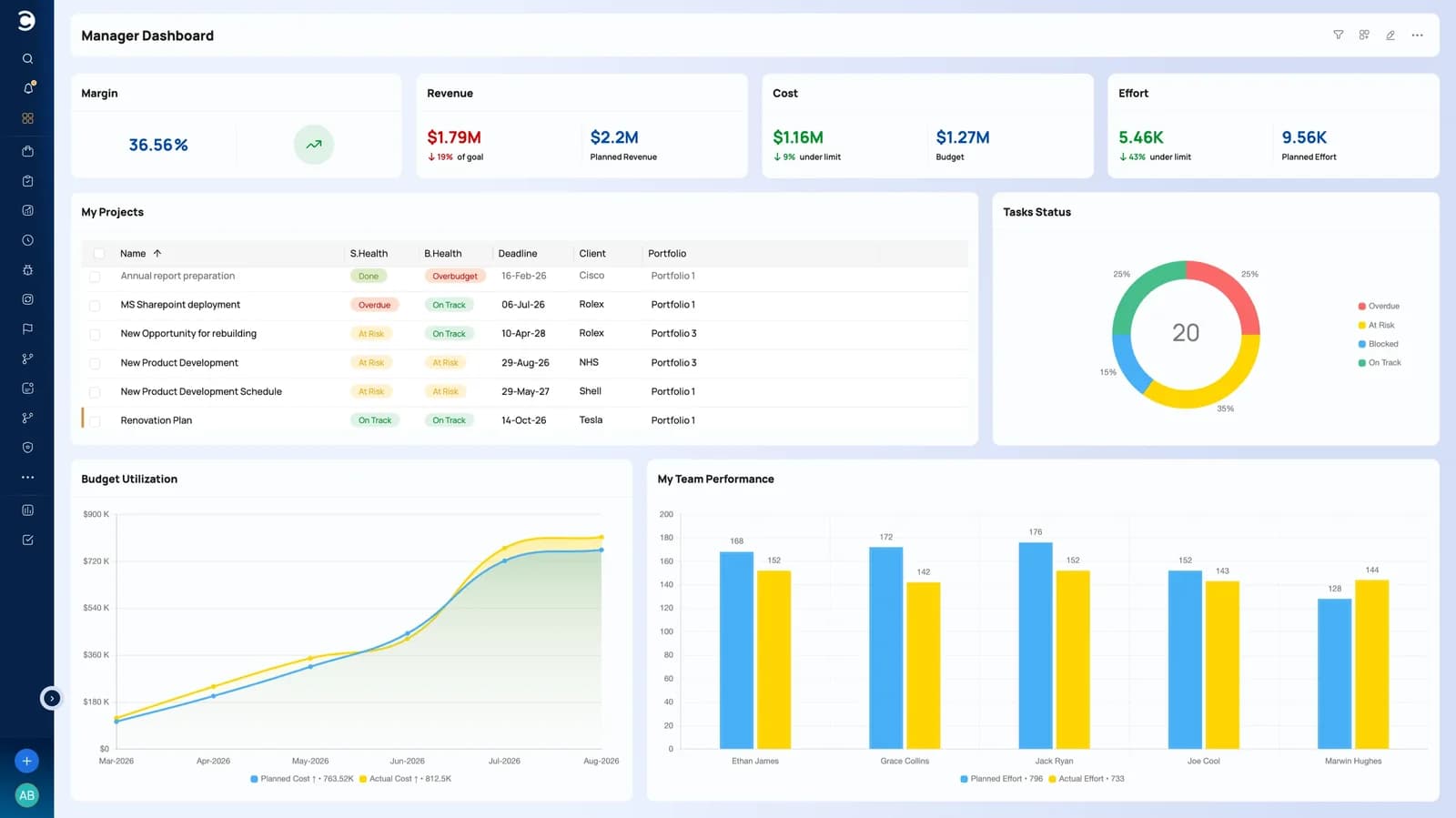
Project Management
From tracking requests to profits and everything in between
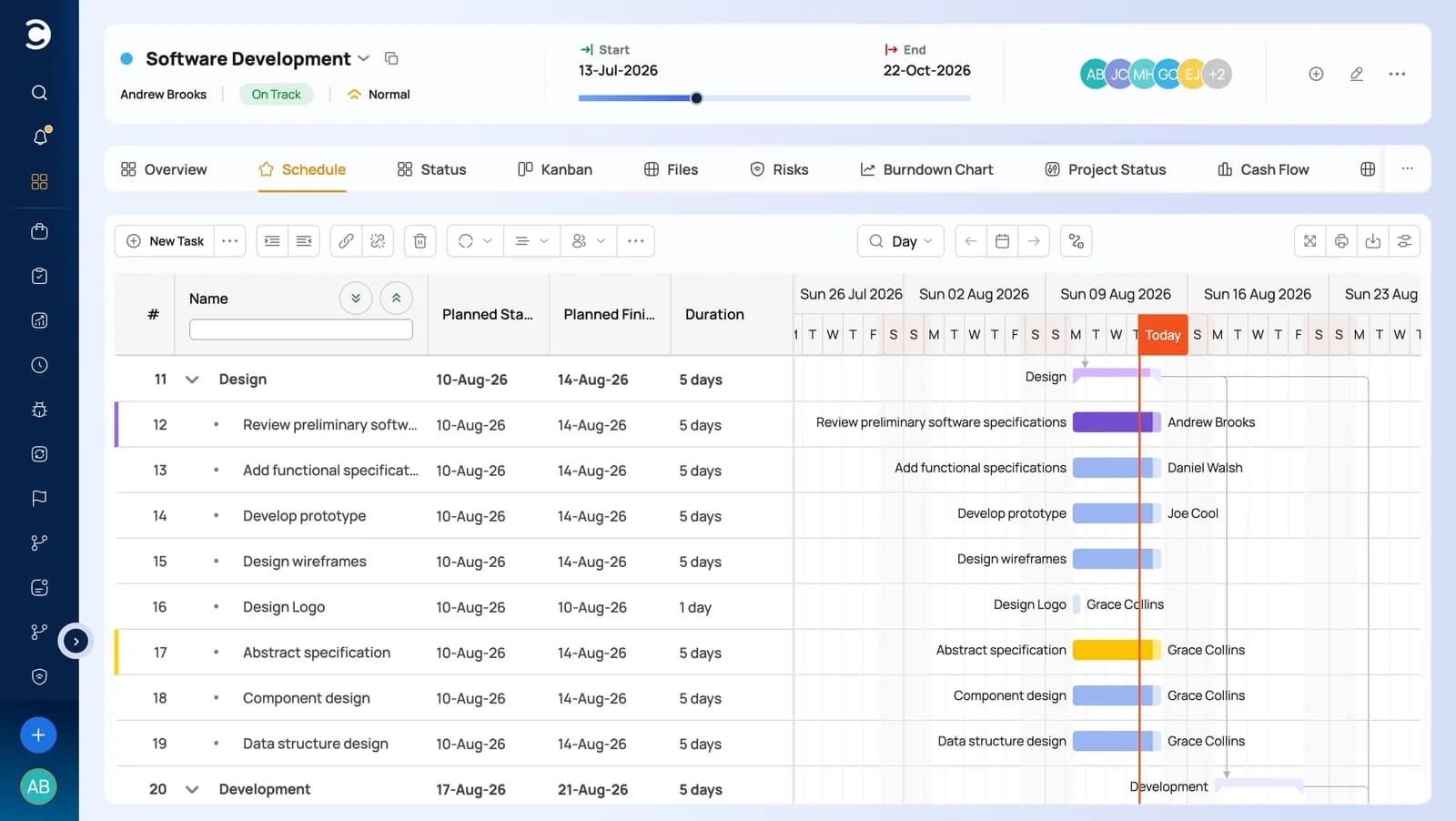
Plan portfolios, sequence demand, and run projects end-to-end with real critical-path scheduling that adjusts as reality shifts.
Resource Management
Right people, right work, real-time capacity
Allocate people by availability, demand, and skills, and optimize utilization with accurate, real-time workload charts.
Financial Management
Real-time budgets, margins, and profitability
Get real-time visibility into budgets, spend, receivables, and profitability across every project and portfolio.
Dashboards & Reporting
360° insight, fully customizable
Consolidate real-time insight across projects and teams with super-powerful, fully customizable dashboards and reports.
Risk & Issue Management
See what puts delivery at risk - early
Track risks, issues, and project health from one place, with RAG indicators and automatic alerts the moment anything slips.

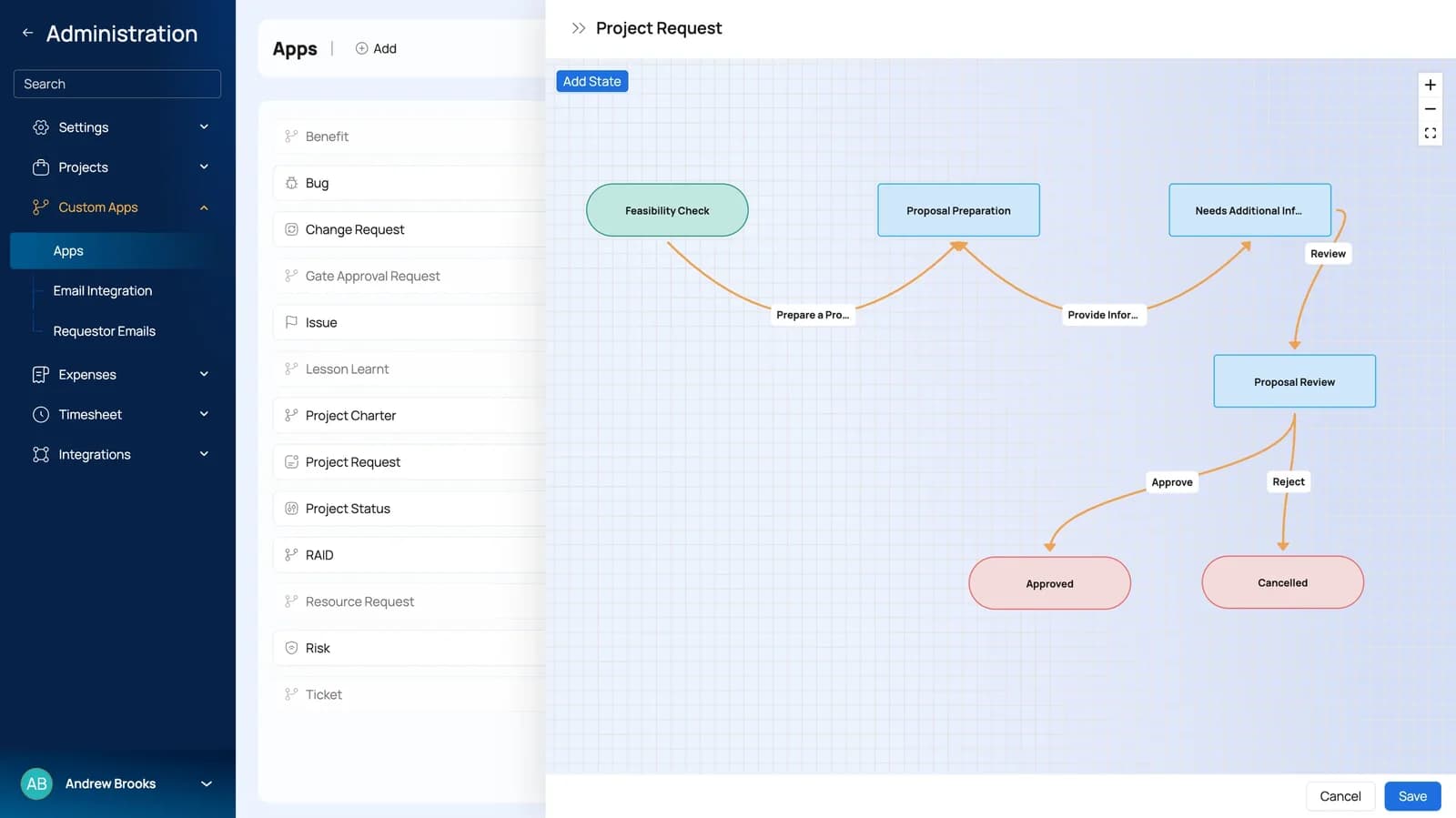
Workflow Automation
Your processes, running alongside your projects
Track business processes alongside projects with built-in workflow apps - or build your own with custom fields, routing rules, and escalation policies.
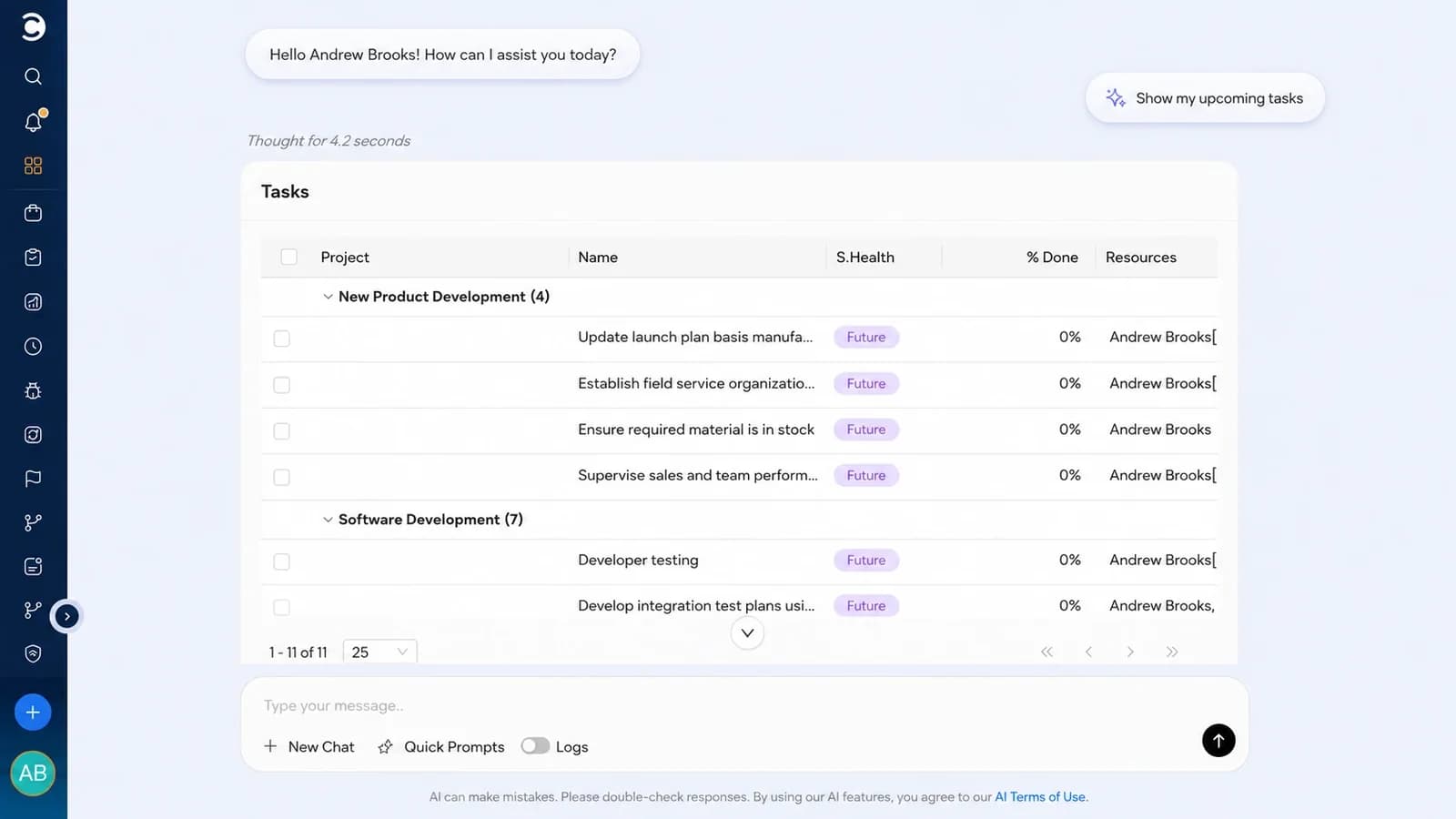
AI Project Intelligence
Meet LEX - decisions, earlier
More than an assistant. LEX analyzes your live project data to deliver real-time insight, actionable solutions, and recommendations from plain-English commands.
Human support and guidance
Software alone does not build a PMO. People do.
You work with people who understand project delivery, not a chatbot. They help you shape workflows, reports, roles, and governance around the way your PMO actually runs.
- Implementation guidanceHelp configuring workflows, reports, roles, and governance
- Human support, 24×524 hours a day, 5 days a week, from people, not bots
- Cloud or on-premiseThe same product, deployed the way your governance needs
Switching
A switch you can run in phases
Existing plans come across, the Microsoft tools your teams already work in stay connected, and onboarding is guided, not left to your team.
monday.com integration
Your existing plans are the starting point
Bring plans in from monday.com and Excel, keep working alongside Microsoft 365, and connect the rest of your delivery stack through 400+ integrations and the REST API.
- Import plans, tasks and assignments from monday.com or Excel
- Microsoft 365 and Okta single sign-on
- Jira, Azure DevOps and QuickBooks for teams already on them
- REST API, webhooks and Zapier for everything else
 Your boards
 Excel
Excel Microsoft 365
 Import & sync with CeloxisPlans, resources and financials in one platform
- 01
Evaluate
Trial with a real plan
Start the 14-day trial with sample data, then import one of your own plans. Judge the platform on work you recognize, not a demo dataset.
- 02
Configure
Match your own process
Set up portfolios, custom fields, security roles, rate cards and approval workflow so governance follows the process you already have.
- 03
Onboard
Get the PMO live first
Guided onboarding and data migration bring the PMO across, with templates and reports in place before the wider rollout.
- 04
Roll out
Add teams in phases
Move portfolio by portfolio, keeping monday.com available while the transition runs. Nothing has to move on one date.
Cloud or on-premise. Your choice.
Run Celoxis in our secure managed cloud, or host it on your own servers when data residency and internal governance decide the answer.
Celoxis Cloud
- Enterprise-grade infrastructure, performance & redundancy
- Encryption, automated backups & role-based access
- Done-for-you setup - live in weeks, not quarters
- Always on the latest release, zero maintenance
On-Premise
- Host on your own physical or private-cloud servers
- Full control over data residency & governance
- One-time perpetual license, transferable seats
- Ideal for regulated, defense & security-first environments
Customer proof
Rated by the reviewers enterprise buyers check first
A consistent top ranker across the major software review platforms, and used to run mission-critical portfolios worldwide.
 G2
G2 Capterra

 Gartner
Celoxis gives us real-time project status without depending on project managers to self-report. That visibility changed how we run our PMO.
Excellent features and genuinely responsive support. The reporting and dashboards give us the depth we need to manage global implementation projects.
Celoxis was built to run real projects. It changed how we work - our decision-making, resourcing, and reporting are all in one place now.
Frequently asked questions
Questions monday.com users ask
01Is Celoxis a true monday.com alternative?
Yes, for PMOs and project teams that need more than flexible boards. Celoxis brings planning, capacity, time and expenses, financials, governance workflows, and portfolio reporting into one product, so the core PMO controls work together from day one instead of being assembled.
02Do we need plugins or automations for core PMO functions?
No. Scheduling with dependencies and critical paths, capacity planning, timesheets, expenses, budgets, risk and issue workflows, and cross-project reporting are built in. Integrations and the REST API are there to connect your wider stack, not to fill gaps in the PMO itself.
03Can Celoxis handle complex project schedules?
Yes. All four dependency types with lead and lag, scheduling constraints, multiple work calendars, summary tasks, milestones, baselines, critical paths, and inter-project dependencies are part of the scheduling engine. Change a duration or a link and the whole schedule recalculates.
04How does capacity planning work?
Capacity comes from the plan itself. Celoxis calculates demand and availability from live assignments, work calendars, roles, holidays, and leave across every active project, so resource managers see over-allocation before new work is committed.
05Can we track budgets, costs, and hours?
Yes. Budgets, planned hours, timesheets, expenses, costs, revenue, billing, forecasts, profit, and margin are connected to the project plan, and they update as time and expenses are logged.
06Will Celoxis help us configure our PMO processes?
Yes. Human onboarding and configuration guidance helps you set up portfolios, custom fields, security roles, rate cards, approval workflows, and reports so they follow the way your PMO already works.
07How should we compare total cost with monday.com?
Look beyond the license line. Add the higher plans, add-ons, automations, and admin time needed to build planning, capacity, financial, and governance controls on boards, then compare that with one product where those controls are already built in. Licensing varies by plan and team size, so compare against your own quote.
08How much setup and ongoing administration does Celoxis need?
Setup is configuration, not construction. You define fields, roles, workflows, and reports once with guided onboarding, instead of designing and maintaining the links between boards, formulas, and automations. Most teams bring the PMO across first and add teams in phases.
09Can executives report across projects without maintaining every board?
Yes. Portfolio dashboards, trend charts, drill-downs, and scheduled reports read live project data, so leaders see health, milestones, financials, and capacity across projects without anyone rebuilding numbers board by board.
- ★★★★★4.6/5 on G2
- 500+ organizations, including NASA, Tesla & the Fortune 500
Bring one project, one capacity conflict,
and one portfolio question.
We will show the plan, workload, time, costs, risks, and executive reporting working as one connected system, using the kind of work your PMO actually runs.
- 14-day free trial
- No credit card required
- All features included
- Import your existing plan