

Project management and billing software connects project plans, tasks, time, expenses, rates and approvals so billable work is easier to find, check and invoice. This guide gives a quick answer and a comparison table of eight platforms: Celoxis, Teamwork.com, Scoro, Productive, Accelo, Paymo, Harvest, and Zoho Projects with Zoho Invoice or Zoho Books. It explains how they were evaluated, what this software does, the common challenges of managing projects and billing, a six-step process for handling multiple projects, which free options are real, how to choose a platform with a demo test, and answers to common questions. The main buying distinction throughout is whether invoices are created inside the platform or in a separate accounting system.
A consultant logs eight hours in one tool. The client rate sits in a spreadsheet. The contract terms live in an email thread. At month end, finance rebuilds what can be billed from all three. Hours go unlogged or are tagged wrongly, an old rate gets applied, and a fixed-fee project quietly runs over its budget. Invoices go out late, clients question them, and nobody is sure whether the project records and the accounting records agree. The fix starts with connecting the plan, the time, the rates and the approvals in one workflow, then choosing the invoicing model that matches how your firm bills. The sections below show how to do both.
Quick answer: what is the best project management billing software?
Project management and billing software connects project plans, tasks, time, expenses, rates and approvals to billing. It shows which approved work can be billed, which time still needs review, and which work has not been invoiced. The best option depends on project complexity, billing arrangements (hourly, fixed fee, retainer) and whether invoices are created inside the platform or in a separate accounting system such as QuickBooks Online.
Project Management Billing Software Comparison
| Software | Best-Fit Buyer | Project Management Depth | Billing Approach |
|---|---|---|---|
| Celoxis | Multi-project consultancies, professional services firms, and PMOs. See resource planning. | Deep: Gantt charts, dependencies, baselines, resource planning, and portfolio reporting | Project billing with billable-time tracking and fixed-price support; QuickBooks Online integration for invoicing (add-on) |
| Teamwork.com | Agencies and client-service teams | Strong: task views, dependencies, workload planning, and retainers | Native invoicing from logged time, available on Accelerate and higher plans |
| Scoro | Professional services firms seeking connected project delivery and billing | Strong: project scheduling, Gantt charts, time tracking, and capacity planning through selected apps | Native invoicing through the Invoice app; accounting integrations available |
| Productive | Agencies and consultancies focused on profitability | Strong: project planning, tasks, resource scheduling, and budgets | Native budget-based invoicing; QuickBooks and Xero integrations on eligible plans |
| Accelo | Professional services firms managing projects, retainers, and support tickets | Moderate to strong: projects, ticketing, retainers, and resource management | Native invoicing and payment tracking; Stripe integration for online payments |
| Paymo | Freelancers, consultants, and small teams | Basic to moderate: task management and time tracking; advanced scheduling and workload features on Pro | Native invoicing; estimates and recurring invoices on eligible paid plans |
| Harvest | Freelancers and teams prioritizing time tracking and client billing | Light: time tracking, project estimates, and budgets | Native invoicing; QuickBooks Online and Xero integrations on paid plans |
| Zoho Projects | Small and growing teams using the Zoho ecosystem. See Celoxis vs Zoho Projects. | Moderate: task management, Gantt charts, timesheets, and project budgets; advanced features vary by plan | Project management connected to invoicing through Zoho Invoice or Zoho Books; integration requires an eligible Projects edition |
How these tools were evaluated
This is a documentation-based comparison, not hands-on testing. For each platform we read current vendor pricing pages, help documentation and integration pages, and checked which plan actually includes each billing feature. The criteria were project management depth, time and expense capture, billing controls (rates, approvals, billable status), accounting handoff, visibility across several projects, usability signals that vendors document, and total cost including seat minimums. We did not assign numerical scores. Where a price or capability could not be confirmed from a vendor source, the entry says so. Prices change often, so confirm them before buying. For a broader view of costs, see hidden costs of project management software.
The 8 best project management billing software options
1. Celoxis
What it helps you do. Celoxis brings project planning, resource allocation, time tracking, expenses, and financial reporting into one system. Teams can monitor billable work, project costs, and invoicing status across multiple client engagements. Its multi-project tracking and resource planning capabilities make it particularly relevant for consultancies and PMOs managing overlapping projects and shared resources.
Project management depth. Celoxis supports Gantt charts, advanced scheduling, dependencies, baselines, project templates, dashboards, and portfolio visibility. Workload tracking and capacity planning are available from Core, while Essentials adds timesheets, job roles, calendars, and resource-conflict visibility. Professional adds expenses and project costing, and Business adds project billing.
The documented billing workflow.
- Configure billing (Celoxis, administrator). Select an organisation-wide user-based or time-code-based billing model. User-based billing assigns rates to individuals, while time-code billing calculates charges according to activities. Client projects can be configured as Fixed Price, Hourly, or None.
- Set billing rates (Celoxis). Define default rates for users or time codes, with project-specific overrides where needed. Rate changes apply to subsequent time entries; existing entries can be updated separately through bulk editing.
- Plan projects and allocate resources (Celoxis). Assign work and estimate resource requirements. Under user-based billing, Celoxis can calculate estimated billable amounts. This estimated-billing calculation is not available under time-code-based billing. For fixed-price projects, the project-level estimate reflects the agreed fixed price.
- Record time and expenses (Celoxis). Team members log their work and expenses against projects. Entries can be marked billable or non-billable. Hourly projects default to billable entries, while Fixed Price projects default to non-billable entries.
- Review and approve billable work (Celoxis). Approved billable time and expenses contribute to actual billable amounts. The documented calculation combines billable hours multiplied by the applicable billing rate with approved billable expenses.
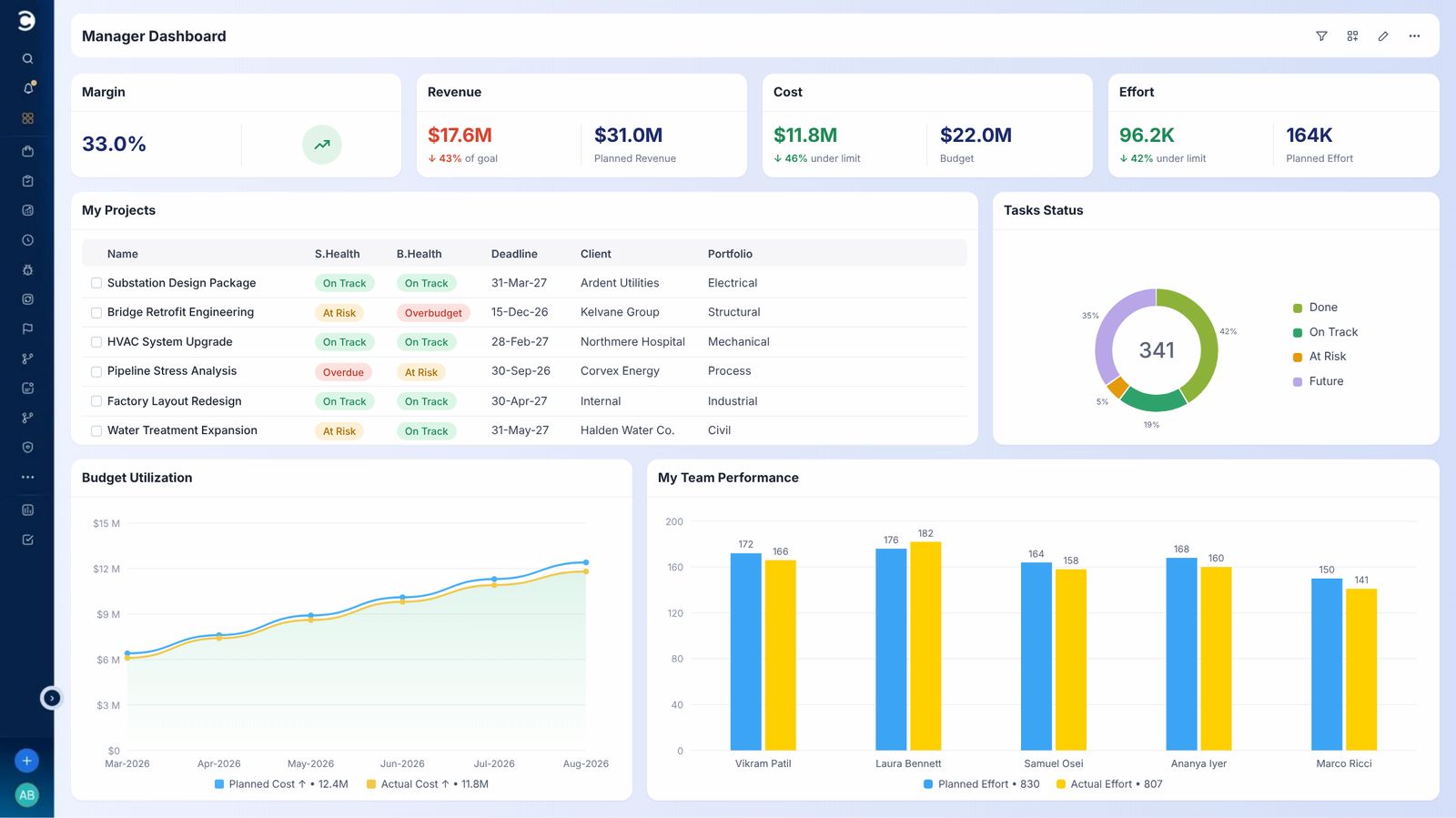
- Monitor project financials (Celoxis). Reports can show estimated billable amounts (where supported), actual billable amounts, and invoiced amounts across projects. This helps managers monitor financial progress and identify billable work that may still need invoicing. See also the guide to financial project management software.
- Handle invoicing (Celoxis and QuickBooks Online). Without an accounting integration, users with the appropriate privilege can mark approved billable time as invoiced in Celoxis. This records invoicing status but does not generate or email invoices. With the QuickBooks Online integration, approved billable time entries can be synchronized to QuickBooks Online for invoice preparation. After invoicing in QuickBooks Online, their invoiced status can be synchronized back to Celoxis.
Additional Latest Celoxis Features
- MCP Integration for AI Assistants: Celoxis supports Model Context Protocol (MCP), allowing users to connect their project management data with AI tools such as ChatGPT Desktop, Claude Desktop, and Cursor. Users can interact with projects, tasks, resources, and reports using natural language. (Currently in beta.)
- Dedicated iOS and Android Mobile Apps: Celoxis offers mobile applications that allow users to manage tasks, update project progress, submit timesheets, review dashboards, and handle approvals while on the move.
- Built-in AI Chat: Celoxis provides an AI chat capability within the platform, giving users another way to interact with project information.
- No-Code Workflow Automation: Celoxis supports customizable workflows, approvals, and business processes, helping organizations reduce manual coordination and standardize operations.
- Modern Integration Capabilities: With REST APIs, webhooks, Zapier, and n8n integration options, Celoxis enables organizations to connect project management with other business applications and automate workflows.
- Real-Time Mobile Portfolio Visibility: Managers and executives can access project health, financial metrics, and portfolio dashboards directly from their mobile devices.
- Flexible Cloud and On-Premise Deployment: Celoxis offers both SaaS and on-premise deployment options, allowing organizations to choose an approach that fits their infrastructure requirements.
Billing capability breakdown
| Capability | Where It Happens |
|---|---|
| Billing models, rates, time approvals, and billable amounts | Native in Celoxis (Business plan). See project billing documentation . |
| Milestone billing | Configurable in Celoxis. Milestone-based invoice tracking can be set up using project tasks and custom fields; it is not a native invoice-generation workflow. See milestone-based billing . |
| Invoice creation and delivery | External accounting workflow. QuickBooks Online can create invoices using synchronized time entries. See the QuickBooks Online integration guide . |
Pricing – Celoxis project billing is available in the Business plan, listed at $45 per Standard user per month when billed annually. The published Business pricing also lists Team-Member users at $29 per month and Timesheet users at $14 per month, with 15 read-only users included. A minimum of five full-access users is required. QuickBooks Online integration is listed as an add-on, with no separate add-on price displayed on the pricing page. There is no permanent free plan, but Celoxis offers a 14-day trial without requiring a credit card. The trial opens with the Business feature set. See Celoxis pricing.
Choose Celoxis if your organisation manages several client projects simultaneously and needs detailed scheduling, shared-resource planning, billable-time tracking, and portfolio-level financial visibility together. It is particularly suitable when project billing needs to stay connected to delivery, while customer invoices are handled through QuickBooks Online or a separate accounting process.
2. Teamwork.com
What it helps you do – Manage client work, track billable time and turn logged time into invoices without leaving the product.
Project management depth – Gantt, table, list and board views, templates, workload planning and time budgets with retainers on Accelerate.
Billing workflow – The Free plan separates billable from non-billable time but cannot invoice. Basics adds billable time reporting. Accelerate applies billable user rates and creates basic invoices from logged time, with QuickBooks and Xero integrations. Optimize, which is quoted on request, adds timesheet approvals, fixed-fee budgets, role and client rates, and invoices with margin, tax and discounts.
Native or integrated – Invoicing is native from Accelerate. Accounting sync is an integration.
Limitation. Client-specific rates, timesheet approval and fixed-fee budgets are listed under Optimize, so teams needing them may be outside the entry plans.
Pricing – Accelerate is 24.99peruserpermonthbilledyearly(29.99 monthly), minimum 5 users. Basics is $9.99, minimum 3. Free allows 5 users and 5 projects. The pricing page offers a 14-day trial on Basics and Accelerate with no card. Source: Teamwork.com pricing.
Choose it if your work is agency-style, you bill by logged time, and you accept a quote for approval and fixed-fee controls.
3. Scoro
What it helps you do – Estimate work, deliver it, track time and bill it, choosing only the modules you need.
Project management depth – The Deliver app offers Gantt charts, dependencies, milestones, templates and retainers. A Resource app covers planning and availability.
Billing workflow – The Invoice app covers sales invoices, receipts, prepayments, scheduled invoices, activity-based billing and payment reminders, with Xero and QuickBooks syncs. The Advanced Work add-on adds activity confirmation before billing and time locking. The Advanced Financials add-on adds rate cards, client profiles, multiple currencies and document approval workflows.
Native or integrated – Invoicing is native. Accounting sync is an integration.
Limitation – Approvals and rate cards sit in paid add-ons, so the real cost depends on the module mix. Source: Scoro modular pricing overview.
Pricing- Scoro’s pricing page says combinations start from €15 per user per month, with a free 14-day trial and a minimum of 5 users. We could not confirm which combination that price covers or the billing period. Third-party figures for older Scoro plans conflict, so we did not use them. See Scoro pricing.
Choose it if you want to price, deliver and invoice work in one platform and can assemble modules to match your approval needs.
4. Productive
What it helps you do – Link project plans, budgets, time, expenses and invoices, and see profitability by client.
Project management depth – Tasks, Gantt, workload and resource planning, budgets and docs are on the Essential plan.
Billing workflow – Productive supports native invoice creation and delivery, draft and finalized invoices, credit notes, and payment reminders. Professional adds recurring budgets for retainer management, billable-time approvals, expense approvals, rate cards, and invoicing integrations. Listed accounting connections include Xero, QuickBooks Online, Exact, e-conomic, Fortnox, and Twinfield.
Native or integrated – Invoice creation and delivery are native in Productive, starting with Essential. Professional adds accounting integrations, billable-time and expense approvals, rate cards, and recurring budgets. Accounting synchronization is handled through integrations.
Limitation – Billable-time approvals, expense approvals, rate cards, recurring budgets, and accounting integrations require Professional. These additional capabilities increase the cost compared with Essential.
Pricing – Productive advertises Essential at approximately $10 per user per month with annual billing and Professional at approximately $25, with monthly billing typically higher. Its official pricing page currently contains inconsistent displayed amounts, so exact rates should be confirmed before publication. All plans require at least three paid seats. Productive offers a 14-day free trial without a credit card, and client users can be invited at no additional charge. See Productive pricing.
Choose it if your agency or consultancy needs project delivery, resource planning, client profitability tracking, and invoicing together, with additional approval controls available on Professional. Read our Mavenlink alternative page.
5. Accelo
What it helps you do – Manage client work from initial quotes through project delivery and invoicing, including recurring retainers, support tickets, time tracking and project financials.
Project management depth – Accelo supports project and task management, time tracking, resource planning, project budgets and financial reporting. It also connects client management, quoting, support tickets and recurring retainers. Confirm current feature access when requesting a quote, as Accelo’s public pricing page no longer provides a detailed plan-by-plan comparison.
Billing workflow – Accelo supports native invoice creation, time-based billing, fixed-fee projects, project expenses, materials and recurring retainer invoices. Users can generate and send invoices directly, record payments and monitor billing alongside project financial performance. Accelo also supports time approvals and automated invoicing workflows, with availability subject to the quoted configuration.
Native or integrated – Invoice creation and delivery are native in Accelo. Payment recording and online payment capabilities are also supported. Accounting integrations include QuickBooks, Xero and Sage Intacct.
Limitation – Public pricing and current plan-level feature allocations are not disclosed in detail. Businesses should confirm whether retainer management, ticketing, expenses and time approvals are included in their proposed package.
Pricing – Accelo uses custom quote-based pricing determined by team size and business requirements. Its official website does not publish standard per-user prices. The current site promotes personalized demos, while free-trial availability is not clearly confirmed. See Accelo pricing.
Choose it if your professional services business manages project work alongside ongoing retainers and support requests, and you want invoicing and financial reporting connected to delivery. For a comparison view, see Celoxis alternatives to Kantata.
6. Paymo
What it helps you do – Track project time, manage tasks and invoice clients from one platform. Estimates, expenses and more advanced project management features are available on higher plans.
Project management depth – Paymo supports task lists on Free, with calendar and Kanban views on Solo. Plus adds project templates, recurring tasks and profitability tracking. Pro adds Gantt charts, task dependencies, employee scheduling and workload management.
Billing workflow – The Free plan includes unlimited time tracking and unlimited invoices, although it is limited to one user, one client and two projects. Solo adds flat-rate and retainer projects. Plus adds estimates, expense tracking and recurring invoices, and is the first plan supporting multiple users. Pro adds timesheet approvals, allowing administrators to approve or reject submitted time entries.
Native or integrated – Invoicing is native. Users can generate invoices from tracked time and, on eligible plans, project charges, expenses or retainer periods.
Limitation – Free and Solo are limited to one user. Estimates and expense tracking require Plus, while Gantt charts, resource scheduling and timesheet approvals require Pro. A multi-step approval workflow beyond the documented timesheet approval process was not confirmed.
Pricing – Free costs $0 for one user, one client and two projects. Standard monthly prices are $9.90 for Solo, $15.90 per user for Plus and $23.90 per user for Pro. Annual billing reduces these to $5.90, $10.90 and $16.90 per user per month, respectively. A temporary promotion offers these lower monthly rates for the first three months to eligible new customers on monthly subscriptions. A 15-day free trial is available without a credit card. See Paymo pricing.
Choose it if you are a freelancer or small team seeking affordable time tracking and client invoicing, with the option to upgrade for estimates, project planning and team scheduling.
7. Harvest
What it helps you do – Capture time and expenses, create client invoices and monitor project budgets.
Project management depth – Light. Harvest focuses on projects, time tracking and budgets rather than advanced project scheduling and task dependencies. Celoxis can also sync Harvest time entries, as described on the Celoxis integrations page.
Billing workflow – Harvest supports invoicing from tracked time, expenses and fixed fees. Teams includes invoicing, team reporting and QuickBooks Online and Xero integrations. Enterprise adds profitability reporting, timesheet approvals, custom reports and activity logs.
Native or integrated – Invoice creation is native in Harvest. Accounting synchronization is handled through integrations.
Limitation – Harvest’s Flex subscriptions combine per-seat pricing with usage-based charges when active projects, clients, tasks or invoicing exceed included allowances. Unlimited billing is available as an alternative. The Free plan supports invoice creation but requires a Stripe connection to email or export invoices as PDFs.
Pricing – Teams starts at $9 per seat per month billed annually ($11 monthly). Enterprise starts at $14 per seat per month billed annually ($17.50 monthly). These are starting rates, and additional usage charges may apply under Flex billing. The Free plan supports one seat and two projects. Harvest offers a 30-day free trial without a credit card. See Harvest pricing.
Choose it if your project scheduling and delivery planning happen elsewhere and you primarily need time tracking, project budgets and client invoicing.
8. Zoho Projects
What it helps you do – Manage projects, track billable time, monitor budgets and create invoices through an integration with Zoho Invoice or Zoho Books.
Project management depth – Zoho Projects includes Gantt charts and task dependencies on its Free plan. Premium adds timesheets with billable and non-billable entries, project budgets, workflow automation and timesheet approvals. Higher plans add advanced portfolio and scheduling capabilities.
Billing workflow – With Zoho Finance Suite integration, approved billable timesheets and project information can sync with Zoho Invoice or Zoho Books. Users can generate invoices for logged hours, milestones and tasks. Invoices and other financial records can also be created and managed through the Finance tab in Zoho Projects once the integration is enabled.
Native or integrated – Project management runs in Zoho Projects, while invoicing is powered by Zoho Invoice or Zoho Books. Although users can access invoicing workflows within Zoho Projects, the billing functionality depends on an integrated finance product.
Limitation – Zoho Finance Suite integration requires Zoho Projects Premium or higher. Zoho Invoice is free, but Zoho Books requires Professional or higher for the documented Projects integration. This adds subscription costs when using Zoho Books.
Pricing – Zoho Projects Premium starts at $4 per user per month billed annually, with a published monthly rate of approximately $5. Enterprise starts at $9 per user per month billed annually, and Ultimate at $14. Zoho Invoice is free. Zoho Books Professional costs $40 per organisation per month billed annually ($50 monthly). Zoho Projects also offers a Free plan for up to five users and three projects, plus a 15-day trial of paid plans without a credit card. See Zoho Projects pricing.
Choose it if your organisation already uses Zoho CRM or Zoho’s accounting products and wants affordable project management connected to client invoicing.
What project management and billing software does
It links the work you plan to the money you can claim for it. The chain has seven links, and a gap in any one of them creates rework at month end:
- Project scope and tasks define what was sold and what is being delivered. Our guide to what project management software is covers this half.
- Resource assignments show who is expected to do the work and at what cost or rate.
- Time and expenses record what actually happened. Billable means the client pays for it. Non-billable means the firm absorbs it.
- Rates and approvals turn hours into amounts and give a manager the chance to check them.
- Billing preparation gathers approved, uninvoiced work for each client.
- Invoice creation produces the document the client receives.
- Accounting and payment records track what was invoiced, recognised and collected.
Software for project management, task tracking and billing does not cover all seven links in the same way. Four setups exist, and they overlap:
- A. Project management with financial tracking. The tool plans work and tracks billable and invoiced amounts but leaves invoice creation to accounting. Celoxis is an example, with its Gantt-based scheduling and billing reports.
- B. Time tracking with invoicing. The tool starts with timers and timesheets and ends with an invoice. Harvest and Paymo sit here, with lighter project structure.
- C. Integrated professional services platforms. One product covers quoting, delivery, time, billing and profitability. Teamwork.com, Scoro, Productive and Accelo fit this group to different degrees.
- D. Project management connected to separate accounting software. Two systems share records through an integration, as with Zoho Projects and Zoho Invoice, or Celoxis and QuickBooks Online. This is project management billing integration software in the plain sense: powerful, but only as reliable as the data mapping between the two.
The categories offer different levels of project control. Type B tools give the cleanest path from hours to invoice. Type A and C tools show whether the plan, the people and the price still line up. Type D setups let a finance team keep its accounting system.
Common challenges when managing projects and billing
Most billing problems begin as workflow problems, long before an invoice is wrong. Someone forgets to log time, an approver is unnamed, a rate is agreed by email and never recorded, or a fixed fee is quoted without a scope boundary. Software can expose these gaps. It cannot fix unclear contracts, poor time-entry habits or missing approval ownership. Those need a decision first. For consulting practices, the same pressure shows up when several clients overlap and the same people serve all of them.
| Challenge | Operational Cause | What to Evaluate in Software |
|---|---|---|
| Unrecorded or misclassified billable work | Time is logged late, or tagged billable or non-billable inconsistently | Default billable flags by project type, reminders, and a view of missing time. See time management tools. |
| Delayed timesheet approvals | No named approver or deadline | Approval roles, pending-entry visibility, bulk approval. The project management basics guide explains timesheet roles. |
| Wrong client or activity rates | Rates held in spreadsheets, or changed without a rule | Rate hierarchy, project overrides, rules for rate changes. Check the Celoxis rate documentation. |
| Fixed-fee scope creep | Effort grows while the price stays fixed | Planned versus actual effort against the fee. Related reading: earned value management and the project management triangle. |
| Unbilled work across several projects | No single list of approved but uninvoiced time | Cross-project reports by client. See multi-project tracking. |
| Duplicate data entry | Time, clients and rates live in two systems | Integration scope and direction. Review integration options and the cost of fragmented tools. |
| Conflicting project and finance records | Two systems each treat themselves as the source of truth | A named system of record, sync status and an exception view. See financial project management software. |
When shortlisting project management software with billing features, ask which of these seven the tool addresses and which still depend on process.
How to manage multiple projects with billing software
The short answer is to fix the rules first and configure the tool second. Six steps work for most consultancies running overlapping engagements:
- Define each project’s commercial terms. Record whether it is hourly, fixed fee, retainer or milestone based, and what is in scope.
- Establish rate and billing rules. Decide the default rate source (person, activity or rate card), who can override it and how rate changes apply.
- Connect tasks, people and time records. Time should attach to a project, a task and a client so billable work can be traced. Good resource scheduling keeps assignments and capacity honest.
- Assign approval responsibility and deadlines. Name one approver per project and agree a weekly cut-off.
- Review exceptions and unbilled work. Look at approved but uninvoiced work, fixed-fee projects running over their effort, and projects with no recent time.
- Reconcile billing records with the accounting system. Confirm that what was invoiced matches what the project tool shows. A PMO view helps when several managers share this job.
Month-end checklist
- Missing timesheets for billable staff
- Unapproved time and expense entries
- Incorrect or outdated rates
- Approved work not yet invoiced
- Scope changes that need a change order or a new estimate
- Synchronisation exceptions between the project tool and accounting
For a consultancy with five clients running at once, the checklist works best when each project manager clears their own projects before finance starts reconciling. Capacity planning also matters here, because billable utilisation depends on knowing who is free. See these capacity planning tools.
Free project management billing software: what is actually free
Some free options exist, but they differ in kind. A permanent free plan stays free with limits. A temporary free trial expires. A free invoice tool creates invoices but not project plans. A free project tool connected to a separate billing product still needs the billing product. Read our broader list of free project management software alongside this section.
| Option | Type | Verified Limits | Invoicing |
|---|---|---|---|
| Teamwork.com Free | Permanent free plan | Up to 5 users and 5 projects | No native invoicing. Available from Accelerate |
| Paymo Free | Permanent free plan | 1 user, 1 client, 2 projects; unlimited tasks and time tracking | Yes, unlimited invoices |
| Harvest Free | Permanent free plan | 1 seat and 2 active projects | Yes. Sending invoices by email or exporting PDFs requires a Stripe connection |
| Zoho Projects Free | Permanent free plan | Up to 5 users and 3 projects | No integrated invoicing on Free. Zoho Invoice is a separate free product; the Projects integration requires Premium or higher |
| Celoxis | 14-day trial, no credit card | Full Business feature set, preloaded sample portfolio, project financials and billing capabilities. Start the trial | Project billing can be evaluated. QuickBooks Online integration is documented, but add-on access during the trial should be confirmed. No permanent free plan |
| Scoro | 14-day trial, no credit card | Trial of selected modular apps, including project management and invoicing | Native invoicing can be evaluated when the Invoice app is included |
| Productive | 14-day trial, no credit card | Trial access to project management, budgets and billing features; availability depends on the evaluated plan | Native invoicing; accounting integrations depend on plan |
| Teamwork.com paid plans | 14-day trial, no credit card | Trials advertised for Basics and Accelerate | Native invoicing can be tested on Accelerate |
| Paymo paid plans | 15-day trial, no credit card | Trial access to features of the selected paid plan | Native invoicing; estimates and advanced approvals depend on plan |
| Harvest paid plans | 30-day trial, no credit card | Trial of paid features, including integrations and reporting | Native invoicing, with accounting integrations on eligible plans |
| Accelo | Demo available; trial not confirmed | Current website promotes personalised demos and custom pricing | Native invoicing; no self-service trial currently advertised |
Check limits on users, projects, invoices, approvals, reporting, integrations and commercial use before relying on any free plan. A free option can be enough for a solo consultant with a few clients and hourly billing. It becomes a poor fit when you need several users, approval steps, client-specific rates, fixed-fee tracking or accounting sync. At that point, compare paid plans using the software pricing models guide.
conclusion
The best project management and billing software is the one that matches how you bill and who owns the invoice. If you run several client projects at once, need schedules and resources next to approved billable amounts, and create invoices in QuickBooks Online or another accounting system, Celoxis is worth evaluating. If you want invoices generated inside the platform, run the demo test on Teamwork.com, Scoro, Productive or Accelo first. If you mainly need timers and invoices, start with Harvest or Paymo.


Comments
0 responses