

If you run a PMO in London, Manchester, Dublin, Amsterdam or Munich, the shortlist you built two years ago probably doesn’t hold up any more. Microsoft Project Online shuts down on 30 September 2026. Per-seat prices across the big work management platforms now come with AI credit bundles and seat blocks. And the features European buyers care about most, such as EU data residency and single sign-on, have moved to the top pricing tiers of several popular tools.
I’ve spent 17 years evaluating project management software across the UK and Europe, and one lesson has held up: the biggest issue is rarely how many features a platform has. It’s whether the platform solves the operational problems the organisation already has.
This guide applies that test to Celoxis and to the tools it most often competes with: Monday.com, Asana, Wrike and Microsoft’s Planner and Project plans. It’s written for operations directors, PMO leads, CTOs and finance-minded executives choosing project management software in the UK and Europe that has to survive procurement, a GDPR review and a CFO asking where the margin went.
The European PM Software Landscape in 2026: What’s Actually Changed
For European enterprises, choosing project management software is no longer just a software decision. It’s a data protection decision, a finance systems decision and, for many Microsoft shops, a forced migration. Four shifts matter most.
Microsoft Project Online’s retirement turned the safe default into a project
Microsoft stopped selling Project Online to new customers on 1 October 2025 and retires the service on 30 September 2026. Project desktop, Project Server Subscription Edition and Planner continue. Planner now carries the premium scheduling features under the Planner and Project plans, which suits lighter teams well. Schedule-driven PMOs that relied on enterprise resource pools and timesheets are asking whether it covers them. We’ve covered the options in detail in our guide to alternatives now that Microsoft is retiring Project Online, and if you’re still weighing the desktop client, read our honest take on the pros and cons of Microsoft Project.
AI became a pricing line, not just a feature
Monday.com now sells AI credits on top of its Standard and Pro seat prices, and Asana allocates AI Studio credits by tier, so AI usage becomes a variable cost to forecast. Seat rules have tightened too: Asana sells in five-seat increments above five users, and Wrike’s Team plan caps at 15. The headline price on a comparison site is rarely the price you pay.
Data residency moved up-market
On Monday.com, EU data residency and SAML sit on the Enterprise plan. On Asana, data residency sits on Enterprise+. For a 60-person mid-market team, the tier that satisfies your Data Protection Officer may not be the tier you were quoted.
UK and EU requirements keep diverging in small, expensive ways
Post-Brexit, a business with teams on both sides of the Channel answers to UK GDPR and EU GDPR, and its data processing agreement should cover both. Under Making Tax Digital, UK project billing data needs to flow cleanly into Xero, Sage or your ERP, and cross-border B2B work adds VAT treatment questions to every client project. Language is another layer: anyone comparing Belgium project management software, for example, needs one system that Dutch, French and German-speaking teams can all work in. These are the project management trends that are here to stay for European buyers, and most global “best of” lists ignore them.
Where Most “Best PM Software” Lists Get It Wrong for UK/Europe Teams
Search for the top project management software solutions in the UK and you’ll see the same names in roughly the same order. Those lists aren’t dishonest, but they answer a different question from the one a mid-market enterprise is asking. Here’s where I disagree.
1. They rank the team tool, not the operating model. Most lists reward ease of use and free plans, which is right for a 12-person marketing team. For an organisation running dozens of concurrent projects, the expensive problem is reconciliation: schedules in one tool, timesheets in another, budgets in spreadsheets, and a PMO analyst rebuilding the Monday report by hand. If that’s your world, start with the category of enterprise project management, then look at the most popular enterprise project management software through that lens.
2. They treat “EU-based” as if it meant “EU-hosted” and “compliant”. Searches for the best EU-based project management software for enterprises surface genuinely European vendors such as Projektron BCS, a German project management software, and Teamwork.com from Ireland. They deserve a look. But headquarters answers only one of four questions; the others are where data is stored, who can access it, and what legal mechanism covers any processing outside the EU. A vendor that hosts in Ireland, restricts access and signs a solid DPA can meet your DPO’s bar even if it isn’t European. Ask every vendor for its subprocessor list.
3. They take “we need on-premise” at face value. An on-premise request should not automatically be treated as a fixed requirement. It may come from security policy, data-location concerns, procurement rules, a need for integration control, or an internal preference nobody has tested. Each of those points to a different answer. Celoxis offers both on-premise project management software and cloud hosting, so the choice isn’t forced, and our comparison of cloud-based and on-premise project management platforms walks through the trade-offs.
4. They compare headline seat prices. Real cost depends on your user mix: how many people plan, how many only log time, and how many executives just need to read dashboards. I’ll show a worked example in the pricing section. For the wider picture, see our guide to project management software pricing models.
How We Evaluated Project Management Software for This Review
A useful evaluation tests the workflows, reports and processes that will actually decide whether the software fits. Logging in and clicking around does not count. We scored every platform against six weighted criteria built for mid-market and enterprise teams in the UK and Europe.
| Criterion | Weight | What we checked |
|---|---|---|
| Portfolio and resource management | 25% | Named and role-based capacity, conflicts, cross-project views, and which plan unlocks them |
| Project financials | 20% | Cost vs bill rates, fixed-price vs hourly projects, expenses, invoiced tracking |
| European compliance and hosting | 20% | EU hosting options, UK and EU GDPR position, SSO, which tier unlocks residency |
| Integration with European business systems | 15% | Route to SAP, Xero UK, Sage and Microsoft 365: native, marketplace or iPaaS, or API only |
| Time to value and admin effort | 10% | Setup effort, admin skills needed, quality of guided onboarding |
| Pricing transparency and total cost | 10% | Published prices, minimums, seat blocks, AI credits, currency |
For integrations, we mapped four European scenarios: SAP for cost centres and project codes, Xero UK and Sage for invoicing and VAT records, Microsoft 365 for identity, and Jira or Azure DevOps for delivery teams. For each tool we recorded whether the route is native, marketplace or Zapier-style, or API-only, because that decides who maintains the integration after go-live. Pricing and plan details were checked against vendor pages and public documentation in September 2026. For a broader method, see our guide to comparing project management software.
Celoxis: Feature Breakdown and Real-World Performance
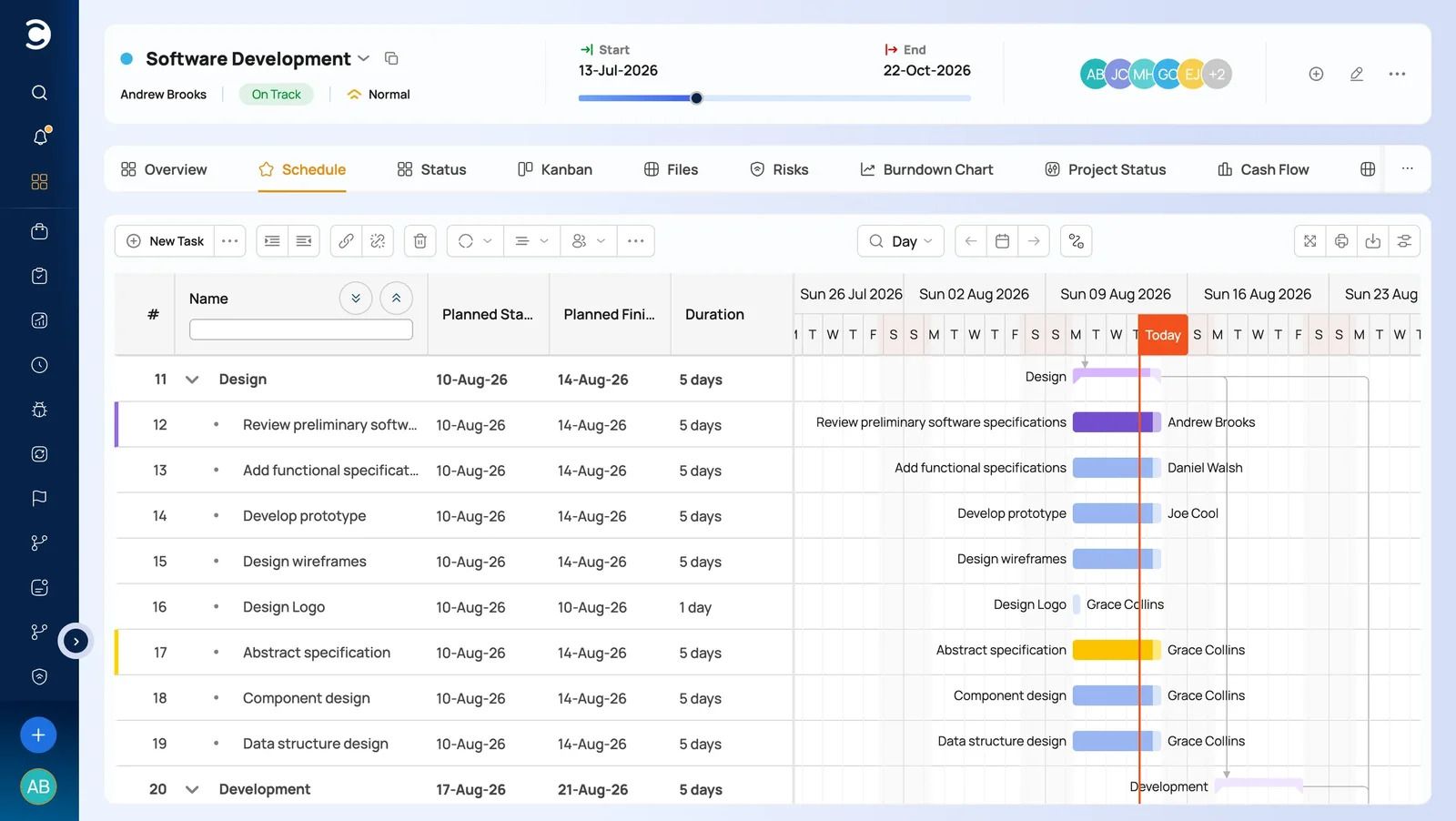
Celoxis is a project portfolio management platform that puts schedules, resources, time, financials, governance and reporting in one system. Here’s what that means in practice, plan by plan. For the complete list, see our overview of project management software features.
Resource management and capacity planning
Workload tracking and capacity planning are available from the entry Core plan. Essentials adds job roles, work calendars and instant resource conflict detection. That distinction matters because “resource planning” means different things to different buyers: named people, role-based capacity, workload balancing or scenario planning. Clarify which one you need before you compare resource and capacity planning tools.
Work calendars matter more in Europe than US-centric reviews admit. Bank holidays differ between England, Scotland and Ireland, and vary by federal state in Germany. A capacity plan that ignores that is wrong before the first task starts. Our guides to resource planning software and capacity planning tools (in French) go deeper, and our Jira vs Microsoft Project vs Celoxis comparison shows how project resource management software handles large programmes.

Time tracking and expenses
Timesheets are included from Essentials and available as an add-on on Core. Two lighter user types change the economics for contractor-heavy teams: Team-Member users work on tasks and log time and expenses, while Timesheet users only fill in timesheets.
Financial management: costing and billing
Costing arrives on the Professional plan, and billing plus a free client portal on Business. According to Celoxis’s billing documentation, you can bill by user rates or by time codes, set each client project to fixed-price or hourly, and override rates for a specific person on a specific project. When a rate changes mid-project, work already done keeps the old rate and future work uses the new one, so historic actuals don’t shift under you. Cross-project reports show billable and invoiced amounts across the portfolio. If you manage performance with earned value management, or you’re in a regulated sector, our guide to project management software for financial services is worth reading.
Custom workflows and Custom Apps
Celoxis Custom Apps let you run processes such as risks, approvals or change requests with their own workflows, custom fields, reports and dashboards. Professional adds intake management, so a project proposal can move through a governed approval route before it becomes a project. It also adds risk tracking, which supports proper risk management in software project management and a working RAID log.
Reporting and portfolio visibility
Every plan includes advanced analytics, aggregated dashboards, baselines and weekly executive reporting, and Essentials adds automatic RAG status. Decide early which KPIs for project managers and portfolio leads matter. If you’re new to the category, start with our PPM tools guide and our explanation of how PPM solutions support project management.

API, integrations and security
API limits scale by plan, from 150 requests an hour on Core to 1,800 on Enterprise. Jira, Azure DevOps, QuickBooks Online and Zapier integrations are listed as add-ons. Microsoft Project plans can be imported with their hierarchy, dependencies, constraints and resource allocations. Identity options include SAML 2.0, Active Directory Federation Services and Okta.
Cloud customers are hosted on AWS in the United States or Ireland, and Celoxis states ISO 27001 and SOC 2 Type 2 audits plus EU GDPR and UK GDPR compliance. The on-premise edition runs on Linux and PostgreSQL.
What Celoxis Does Well (With Specific Use Cases)
The PMO drowning in manual consolidation. When a buyer tells me they want “better reporting”, I ask what that actually means. It can mean less manual consolidation, more trusted data, faster drill-down or better executive visibility. For teams whose schedules, resources, time, financials and governance live in separate places, Celoxis connects those areas in one system, so the executive report is built from the same data teams update every day. That is the core reason Celoxis wins evaluations against lighter project management collaboration tools.

Consultancies and agencies that bill by the hour. Separate cost and bill rates, project-level overrides, fixed-price and hourly projects side by side, and free client access make Celoxis a strong fit for professional services. It’s also why buyers looking for a Mavenlink alternative or marketing agency project management software end up on our shortlist.
Project Online migrators. Teams leaving Project Online need enterprise scheduling, timesheets, portfolio reporting and a clean import path for existing plans. Celoxis covers all four.
Mixed workforces. With contractors on Timesheet licences and executives on free Read-Only access, you pay for planning capability only where it’s used.
Where Celoxis Falls Short, and Who Should Look Elsewhere
No tool fits everyone. These are the gaps I’d want a UK or European buyer to know before a demo.
No native UK accounting connector. QuickBooks Online is the documented accounting integration. Xero, Sage AI and SAP need the API, Zapier or scheduled exports and with Sage increasingly embedding AI across its UK accounting products, finance teams will want to ensure their integration path supports real-time data flow rather than scheduled exports. For a finance team working under Making Tax Digital, budget for that integration as a small project, not a checkbox.
Currency and VAT sit outside the tool. I would not assume multi-currency project billing. Older user reviews flagged it as a gap, and the billing documentation doesn’t describe per-project currencies. VAT calculation belongs in your finance system anyway. Ask for a live demo with GBP and EUR client projects side by side before you commit.
Milestone billing needs configuration. Celoxis’s own documentation says milestone-based billing isn’t out of the box and is set up with custom fields and invoice tasks. It works, but someone has to own the configuration.
Small teams will find it heavy. The minimum is five full-access users on annual prepaid plans, with no refunds after purchase.
Who should look elsewhere:
- Teams of under ten people with simple task lists will be happier on a lighter tool. Our roundup of free project management software is a good starting point.
- Microsoft-centric organisations with light scheduling needs may find Planner is enough.
- Engineering teams that live entirely in Jira may not need a separate PPM layer. See our guide to engineering project management software before deciding.
- Organisations whose policy requires an EU-headquartered vendor should shortlist Projektron BCS, Teamwork.com or Meisterplan. Celoxis offers EU hosting, but it isn’t an EU-headquartered company.
Pricing Transparency: European Billing Realities
Celoxis publishes its full price list, which is still unusual at the enterprise end of the market. All prices are in US dollars, per user per month, prepaid annually, with a minimum of five full-access users.
| Plan | Standard user | Team-Member user | Timesheet user | Free read-only users | Adds |
|---|---|---|---|---|---|
| Core | $10 | Not available | Not available | 2 | Dashboards, Gantt, portfolio management |
| Essentials | $25 | $18 | $12 | 5 | Timesheets, job roles, resource planning |
| Professional | $35 | $24 | $12 | 10 | Risk tracking, intake, costing |
| Business | $45 | $29 | $14 | 15 | Billing, client portal, advanced security |
| Enterprise | Custom | Custom | Custom | Custom | Strategic portfolio management, higher limits |
A worked example. Take a 60-person PMO with 10 project managers, 35 delivery staff and 15 contractors on Professional. At list price that’s 10 × $35 + 35 × $24 + 15 × $12, or $1,370 a month and $16,440 a year, with ten free read-only seats for executives. The same 60 people on Asana Advanced at $24.99 a seat comes to roughly $17,990 a year, and data residency still requires Enterprise+. On Monday.com, portfolio and resource management sit on the quote-only Enterprise plan. On Wrike, budgeting sits on the quote-only Pinnacle plan. List prices before tax and negotiation, but they show why user mix beats headline price.
What European finance teams should plan for:
- Currency exposure. Invoices in USD mean your GBP or EUR cost moves with exchange rates. Build a buffer into the budget, and ask whether local-currency invoicing is possible.
- Bank charges. Payment is by card or international bank wire, and Celoxis states that bank charges are borne by the customer.
- VAT. B2B software bought from a supplier outside the UK or EU is generally handled under the reverse charge. Confirm the treatment with your finance team or adviser; this isn’t tax advice.
- Budget cycles. Many UK organisations run an April to March financial year, while much of the EU runs to the calendar year. Time your annual prepayment to your cycle.
- Hidden costs. Integration work, admin time and training rarely appear on a pricing page. Our guide to the hidden costs of project management software (in German) lists what to budget for.
Implementation and Support: UK/Europe-Specific Considerations
Choose your hosting region before you load data. Celoxis runs a separate European data centre, so decide on it at the start of your evaluation, not after go-live.
Review the DPA with your DPO. Starting a Celoxis trial means agreeing to its data processing agreement, so read it early. Ask for the subprocessor list and confirm the transfer mechanism for any processing outside the UK and EU.
Set work calendars per country. Load bank holidays for every country and region you staff from before you build capacity plans. For more on running project management software for distributed teams (in Spanish), including timezone overlap, see our remote teams guide.
Match the support tier to your risk. Support runs from Community on Core to Standard, Premium and VIP on higher plans. Confirm support hours overlap with UK and Central European working time.
If you’re leaving Project Online, move now. With the retirement date days away, export your plans and timesheet history first, then import schedules into your new platform.
Run a guided evaluation, not a login. Celoxis can support a guided evaluation built around your real workflows and reports, rather than handing over a login and leaving you to work it out. Our project management software trial guide explains how. Hosting, security, budgeting cycles and procurement rules will also shape the decision; treat them as organisation-specific requirements and verify each one rather than assuming them from geography.
The Verdict: Who Should Buy Celoxis in 2026
Celoxis is a strong buy if you’re a mid-market or enterprise organisation whose schedule, resource, time, financial and governance data lives in separate tools, and someone pays for that in manual reconciliation. It suits professional services firms tracking cost and bill rates separately, PMOs leaving Project Online, and organisations with many contractors or read-only stakeholders.
Look elsewhere if you’re a small team with simple task lists, you need native Xero or Sage connectors without any integration work, you need multi-currency billing inside the PM tool and can’t verify it in a demo, or your policy requires an EU-headquartered vendor.

Celoxis vs Monday.com vs Asana vs Wrike vs Microsoft: Structured Comparison
Scores are out of 5 and reflect my weighting for mid-market PMOs in the UK and Europe. They’re based on published plan features and pricing as of September 2026. For a longer list of options, see our portfolio project management software comparison and our guide to Wrike alternatives.
| Criterion | Celoxis | monday.com | Asana | Wrike | Microsoft Planner and Project plans |
|---|---|---|---|---|---|
| Portfolio and resource depth | 5 | 3 | 3 | 4 | 2 |
| Project financials | 4 | 2 | 2 | 3 | 2 |
| EU hosting and residency access | 4 | 2 | 2 | 3 | 4 |
| Time to value | 3 | 5 | 5 | 3 | 4 |
| Pricing transparency | 5 | 3 | 3 | 2 | 4 |
| Where the key enterprise features sit | Resources from Core, costing on Professional | Portfolio and resources on Enterprise | Portfolios and workload on Advanced, residency on Enterprise+ | Budgeting and advanced resourcing on Pinnacle | Premium planning on paid Planner and Project plans |
Scoring rationale. Celoxis leads on resource depth and financials because costing, billing and capacity planning sit in published plans; it loses a point on financials for the currency and connector gaps, and two on time to value because its depth needs an owner. Monday.com and Asana are the fastest to adopt, but PMO features and EU residency sit on top tiers. Wrike offers strong resourcing and BI on Pinnacle, against a dense interface and quote-only pricing. Microsoft scores well on hosting through its EU Data Boundary and on familiarity, but loses resource depth with Project Online’s retirement. Teams comparing against other IT project management tools or SaaS project management tools (in Spanish) can apply the same criteria.


Comments
0 responses